

Before We Begin #
The examples I’m introducing today require the .NET 10 and C# 14 environment, officially released on November 11, 2025. If you haven’t installed it yet, you can download it from the official website.
If you’re all set, let’s dive right in!
Why Do We Need C# 14 Extension Blocks? #
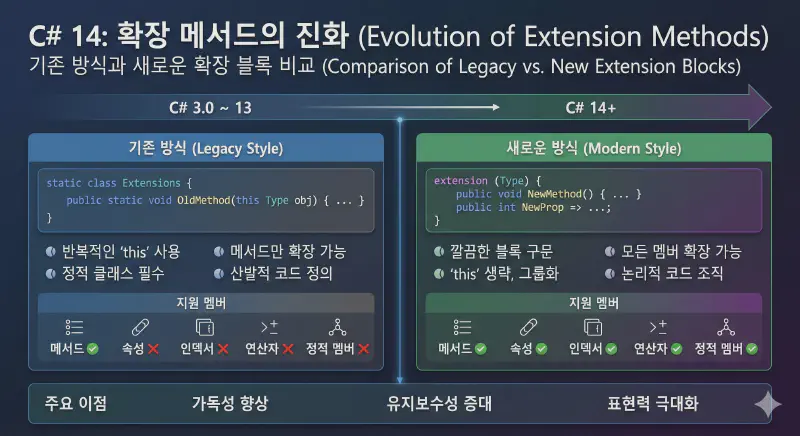
The traditional approach worked well enough, but there were a few itchy spots.
- Methods only: You couldn’t extend properties or operators.
- Repetitive code: Every time you extended the same type, you had to write
this TypeName parameterover and over. - No static extensions: You couldn’t add static members to the type itself, only to instances.
For example, checking if a list is empty with myList.IsEmpty() — those parentheses sometimes feel a bit awkward, don’t they? I’m sure you’ve thought at least once, “I wish I could just write myList.IsEmpty as a property.”
C# 14 Extension Blocks: Core Concepts and Syntax #
C# 14 extension blocks solve all of these problems. Now you can define not just methods, but also properties, operators, and static members all in one block.
Changes Through Examples #
Let’s convert a piece of code that checks if a string is empty using the new syntax.
// New approach: Using extension blocks
public static class EnumerableExtensions
{
    extension(IEnumerable source)
    {
        // Now you can define it as a 'property' instead of a method!
        public bool IsEmpty => !source.Any();
    }
}
Pretty intuitive, right? Just write the extension keyword followed by the type and name you want to extend, then put whatever members you want inside the curly braces. When calling it, you can naturally access it as a property like numbers.IsEmpty, which looks much cleaner.
Practical Example: String Utilities & Property Extensions #
Here’s a string utility example that you can actually use in practice.
public static class StringExtensions
{
    extension(string str)
    {
        public bool IsEmpty => string.IsNullOrEmpty(str);
        public bool IsValidEmail => str.Contains("@") && str.Contains(".");

        public string Truncate(int maxLength)
        {
            if (str.Length <= maxLength) return str;
            return str.Substring(0, maxLength) + "...";
        }
    }
}
Now you can write email.IsEmpty or email.IsValidEmail. Without the parentheses, the code becomes so much easier to read.
Static Extensions #
This is truly a game-changer. You can add members to the type itself, not just instances. Simply omit the parameter name to create a static extension.
public static class ListExtensions
{
    extension(List)
    {
        // A static property called directly on the type
        public static List Empty => new List();
    }
}

// Usage
var myNewList = List.Empty;
This was previously impossible, and it’s going to be incredibly useful for creating factory methods and utility functions.
3 Limitations and Constraints of Extension Blocks #
Of course, it’s not a silver bullet. There are a few points to keep in mind.
No Adding Fields #
Extension blocks are about attaching ‘functionality’ to an existing type, not creating new ‘data storage’. That’s why you can’t use fields or auto-implemented properties that require backing storage.
extension(User user)
{
    // ❌ Error: You cannot declare fields inside extension blocks.
    private int _accessCount;

    // ❌ Error: Auto-implemented properties that require fields are not allowed either.
    public string Nickname { get; set; }

    // ✅ Computed properties (logic only) are fine!
    public string FullName => $"{user.FirstName} {user.LastName}";
}
Original Members Take Priority #
What happens if the type you’re extending already has a method or property with the same name? C# always prioritizes the original type’s members. Remember, extensions can never override or intercept the original.
extension(string str)
{
    // ⚠️ The original string already has a Length property, right?
    // This code won't cause an error, but calling str.Length will always return the original value.
    public int Length => 999;
}

string name = "Gemini";
Console.WriteLine(name.Length); // The result is '6', not 999!
Generic Constraints #
When using generics (T) in extension blocks, the type parameter must be included in the type being extended (the Receiver).
// ✅ T is contained within List<T>, so this is valid.
extension(List<T> list)
{
    public void PrintAll() => list.ForEach(Console.WriteLine);
}

// ❌ Error: T2 doesn't belong anywhere in the extension target List<T1>.
extension(List<T1> list)
{
    public void DoSomething<T2>(T2 extra) { /* ... */ }
}
In Summary! #
“Extension blocks provide a new perspective (View) on a type — they don’t modify the type’s blueprint itself.”
Just remember these three points, and you’ll save yourself a lot of trial and error when working with extension blocks.
Wrapping Up #
C# 14 extension blocks are a welcome change that helps us express our code in a more ‘C#-like’ way. You can also mix them with the traditional approach, so there’s no need to rewrite all your code right away.
Why not start by applying them to small utilities in the new .NET 10 environment? You’ll feel your code becoming much lighter.
Recent